Download Facebook Videos
HD, 1080p & MP4 (2025)

A practical guide to saving Facebook videos in high quality on any device, including Reels, Stories, and finished Live videos.

Download Facebook videos in HD MP4 1080p using FreeSocialDownloader

If you want to download facebook videos hd without installing apps, the cleanest approach is simple: copy the video link, paste it into a browser downloader, pick MP4, then save the file to your device. You can get 720p or 1080p only when Facebook provides that quality for the original upload. This guide explains link types (posts, Reels, fb.watch), device steps (iPhone, Android, PC), and the most common problems: private videos, no sound, and “download not working” cases.

How to Download Facebook Videos in HD

A reliable method, plus quality rules that prevent wasted time.

Steps to download Facebook videos in HD MP4 using a browser downloader

Step-by-step (works for most links)

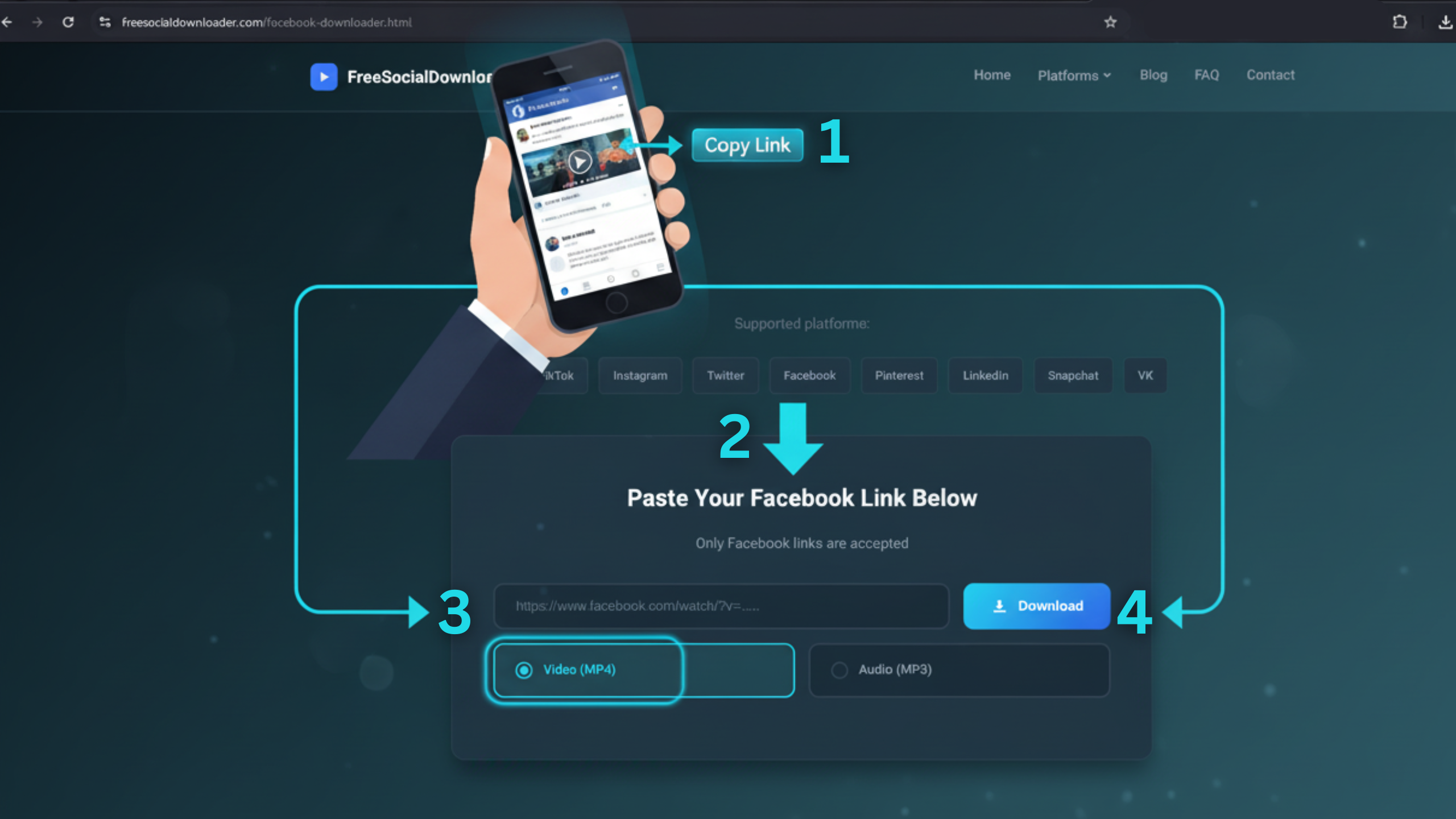
  1. Copy the Facebook video URL from the post, Reel, or Watch page.
  2. Open FreeSocialDownloader.com and go to the Facebook downloader tool.
  3. Paste the link into the input field.
  4. Select MP4 for the most compatible option (fb video download mp4).
  5. Choose the highest available quality (HD/1080p appears only if Facebook serves it).
  6. Download and save to your device storage.
Quality rule that saves time: A downloader cannot “upgrade” a video. If Facebook only provides 480p or 720p for that post, you will not get 1080p. This explains why some searches for download facebook videos 1080p end in a lower resolution file.

To download Facebook videos in HD, copy the video link, paste it into FreeSocialDownloader.com, select MP4, then choose the highest quality available and save the file. HD (720p/1080p) depends on what Facebook serves for the original upload, so not every video has a Full HD option.

Formats, Quality Levels, and Audio

Facebook video formats MP4, HD, 1080p, audio options explained

Main entities you will see

  • Facebook video URL: the link to a post, Reel, Watch, or fb.watch page.
  • Downloader tool: a web tool that extracts Facebook streams and offers file downloads.
  • MP4: the most common container for video playback across devices.
  • MP3: an audio-only format used when you only need sound.
  • Resolution: 360p, 480p, 720p (HD), 1080p (Full HD), and sometimes higher when available.

MP4 vs MP3

  • MP4 is the default for saving a full video file. It works on iPhone, Android, Windows, and macOS.
  • MP3 is best when the video is mostly speech, a lesson, or an interview and you want a smaller file.

HD, 1080p, 60fps, and 4K

“HD” usually means 720p or 1080p, but Facebook decides which streams are available for each upload. For download facebook videos 1080p, you need a post that Facebook serves as Full HD. For download facebook 60fps videos and “Facebook 4K,” availability varies by uploader settings, source footage, and Facebook processing. A tool can fetch only what exists, not what you wish existed.

Download Facebook videos with sound

If an MP4 downloads with no sound, the most common reason is separate audio and video tracks. Some browsers or blocked streams fail to merge them. Try a different quality option first. If it still happens, open the same link in another browser and retry the download.

Quick check: If the video plays with sound on Facebook but your file is silent, the stream tracks likely separated. Switching from 1080p to 720p (or the reverse) often changes the track packaging and fixes it.

Device Guides: iPhone, Android, and PC

Download Facebook videos on iPhone, Android, and PC devices

iPhone / iPad (Safari)

  1. Open the Facebook app and tap Share on the video.
  2. Tap Copy link.
  3. Open Safari and go to FreeSocialDownloader.com.
  4. Paste the link, select MP4, then download.
  5. Open the Files app → Downloads to find the saved file.

This method is the most consistent way to download facebook videos iphone without extra apps. It also avoids “unknown source” installs that cause issues on iOS.

Android (Chrome)

  1. Copy the video link from Facebook.
  2. Open Chrome and paste the link into the downloader tool.
  3. Pick MP4, select quality, and download.
  4. Find the file in Downloads or your Gallery (varies by device).

If your goal is a facebook downloader android flow with no installs, browser download is the safest choice.

Windows / Mac (Chrome / Edge / Safari)

  1. Open the Facebook video in a browser.
  2. Copy the URL from the address bar.
  3. Paste the link into the downloader and choose MP4.
  4. Save to your Downloads folder.

Desktop is usually the most reliable option for download fb videos pc, large HD files, and long Live replays.

Tip that prevents broken links: If Facebook opens an in-app browser, tap the menu and choose “Open in browser,” then copy the final URL. Many “download not working” reports start with a redirected link.

Private Videos: What Works and What Fails

Many users search for a facebook private video downloader, but “private” can mean multiple things: friends-only posts, private groups, restricted pages, or videos that require login. The practical rule is simple: if you do not have permission to view the video, you should not try to download it.

Cases where downloading can work

  • You can view the video in your browser while logged in.
  • The video is in a private group you belong to.
  • The post is friends-only and you are an approved viewer.

Cases where it will fail

  • You do not have access to the post or group.
  • The post is removed, disabled, or region blocked.
  • The page is age restricted and your account cannot access it.
Security note: Avoid tools that ask for your Facebook password. A secure facebook downloader should not require login credentials to download public videos.

Comparison: Best Methods by Situation

Method A is best for speed. Method B works when links are tricky.

Quick comparison

  • Method A (Browser downloader): best for fast saves, HD options, and no installs.
  • Method B (Desktop browser copy): best for long videos, Live replays, and stable URLs.
  • Method C (Save inside Facebook): best for bookmarking, not file downloads.
  • Method D (Screen recording): works when nothing else works, but quality and audio may suffer.

Which method should you use?

If you want download fb video no app, use the browser downloader flow first. If the link keeps redirecting or fails, open the video in a desktop browser, copy the final URL, and try again. Screen recording is a last resort because it can reduce quality, add UI overlays, and create larger files.

A common question is: “Why do some tools feel fast and others feel broken?” Facebook changes stream formats often. A tool that updates regularly stays compatible longer.

If Download Isn’t Working: Causes and Fixes

The fastest fixes first, with clear reasons behind each one.

1) The link is incomplete or redirected

Some shares copy a short redirect URL that breaks extraction. Open the link in a browser first, then copy the full URL from the address bar and retry.

2) The video is private or permissioned

If you cannot watch the video when logged out (or without membership), a tool cannot fetch it. Use only content you can access and have permission to save.

3) Region blocks and age gates

Some videos play inside the app but block direct stream access. Try another browser, or test the same link on mobile and desktop to see which version resolves the restriction.

4) MP4 downloads with no sound

Switch quality and retry. If the file remains silent, try another browser. If you only need audio, download MP3 instead.

5) Facebook changed stream packaging

This is why older grabbers fail. If a link worked last month and fails today, use a tool that adapts quickly and supports modern streams.

Quick reset checklist: Paste the link again, retry once, switch browser, then retry. If it still fails, it is usually a permission or restriction issue.

Real Use Cases People Actually Have

Short scenarios that match how people save videos in real life.

Use case: saving a tutorial before a flight

You find a short repair tutorial in your feed, but you will be offline later. You copy the link, download MP4, and save it to your phone. When you need it, the video is already in your Files or Downloads folder.

Use case: archiving a Live replay

A creator posts a long Live replay with useful details. Live streams can disappear or get edited. Downloading the replay after it finishes gives you a stable copy for personal reference.

Use case: keeping a short clip in HD

You want to save facebook clips hd for your own offline viewing. The key is choosing the highest quality that Facebook serves for that clip. If HD is available, you will see 720p or 1080p options in the downloader results.

Many users ask: “Should I download from mobile or desktop?” Mobile is fastest for quick saves. Desktop is better for long videos and fewer redirect problems.

FAQ

Short answers to common questions about Facebook HD downloads, Reels, Stories, and link issues.

How do I download Facebook videos in HD?
Copy the video link, paste it into FreeSocialDownloader.com, select MP4, then choose the highest quality available and save.
Can I download Facebook videos as MP4?
Yes. MP4 is the most compatible format for iPhone, Android, Windows, and macOS.
Why can’t I get 1080p on some videos?
Facebook only provides 1080p if the original upload has a Full HD stream available for that post.
Does fb.watch video download work the same way?
Usually yes. If it fails, open the fb.watch link in a browser once and copy the expanded URL.
How do I download Facebook Reels in MP4?
Copy the Reel link from the Share menu, paste it into the downloader, select MP4, then download.
Can I download Facebook Stories?
Only while the Story is still available and accessible to you. Stories expire, and private Stories require permission.
Can I download a Facebook Live video?
Most tools work after the Live ends and Facebook posts it as a replay video.
How do I download Facebook videos on iPhone?
Use Safari, paste the link, download MP4, then find it in the Files app under Downloads.
How do I download Facebook videos on Android?
Use Chrome, paste the link, download MP4, then check the Downloads folder or Gallery.
How do I download Facebook videos on PC?
Open the video in a browser, copy the URL, paste it into the downloader, then save the MP4 file.
Do I need to install an app to save Facebook videos online?
No. A browser-based downloader is enough for most public Facebook videos.
Do I need to log in to download Facebook videos?
Not for public videos. For private videos, you must already have access to view them.
Is there a way to download private Facebook videos?
Only if you are permitted to view them (friends-only, private group membership, or shared access). Otherwise it should fail.
Why does my downloaded MP4 have no sound?
Facebook may serve audio and video as separate tracks. Try another quality option or a different browser, or download MP3 if you only need audio.
Can I download Facebook videos in 60fps?
Only if Facebook serves a 60fps stream for that upload. Many posts do not provide a 60fps option.
Does Facebook 4K download always work?
No. 4K is available only when the original upload and Facebook processing provide a 4K stream.
Where do downloaded videos save on my device?
Usually in your Downloads folder, or in the Files app on iPhone. Your browser settings can change the location.
What is the safest way to download Facebook videos?
Use a tool that does not request your Facebook password, and download only content you are allowed to access.
Why can’t I download some videos at all?
Common reasons are private access, region blocks, age restrictions, removed posts, or stream format changes.
Is downloading Facebook videos legal for personal use?
For personal use it can be acceptable when you have permission. Copyright still belongs to the creator or rights holder.
To download Facebook videos in HD, focus on the basics: copy the correct link, choose MP4, and select the highest quality Facebook serves. When downloads fail, it is usually a redirect link, a private post, or a restriction issue. For fast, no-login downloads on iPhone, Android, and PC, FreeSocialDownloader.com gives you a clean way to save videos in seconds.

Blog & Tutorials

Practical guides to download videos in HD from all major platforms.