Snapchat Video Downloader
MP4 & HD (2025)

A practical guide to saving Snapchat videos from public Spotlight and public profiles as MP4 on any device, with clear limits and fixes.

Snapchat video downloader MP4 HD guide using FreeSocialDownloader

If you need a Snapchat video downloader that works in a browser, the clean workflow is simple: get a shareable link from a public source (usually Spotlight or a public profile), paste it into a downloader, choose MP4, then save. Snapchat access rules matter more than tools. Private chats, private Stories, and content you cannot view in a browser typically cannot be downloaded as a file. This guide explains what is realistic, how to save Snapchat videos online on iPhone, Android, and PC, and how to avoid common link and quality problems.

How to Download Snapchat Videos as MP4

A reliable method, plus rules that stop wasted attempts.

Steps to download Snapchat videos as MP4 using a browser tool

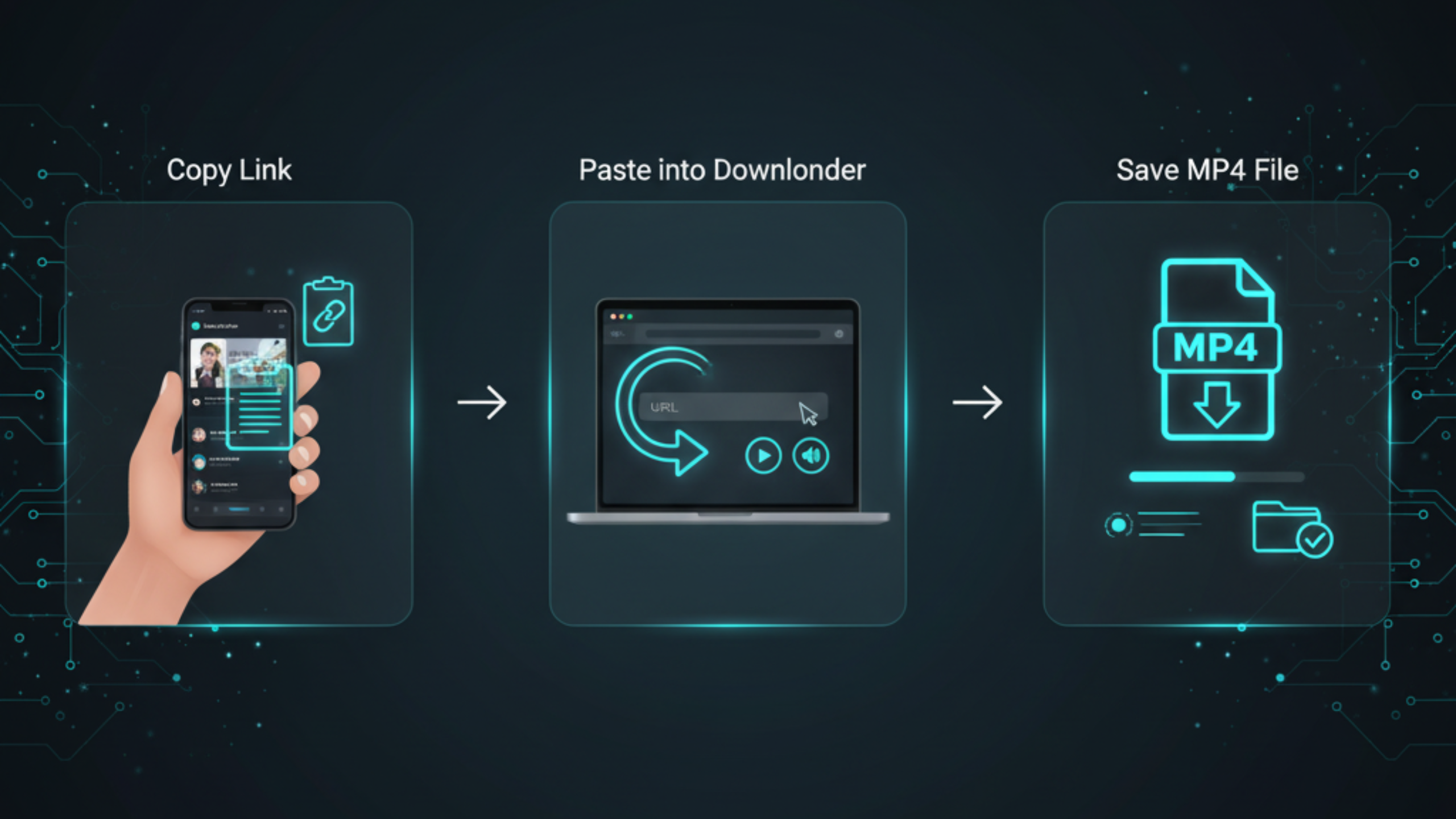
Step-by-step (works for public links)

  1. Find the video source (Spotlight, public profile, or a public page that offers a share link).
  2. Copy the share link and keep it clean (avoid shorteners when possible).
  3. Open FreeSocialDownloader.com and use the Snapchat downloader tool.
  4. Paste the link into the input field.
  5. Select MP4 as the output format (Snapchat MP4 download).
  6. Choose the best available quality (Snapchat to HD only works when the stream is served in HD).
  7. Download and save the file to your device storage.
Reality check that saves time: A tool cannot download what Snapchat does not expose via a public link. If the video is in a private chat, private Story, or requires login-only access, a web downloader will usually fail.

To download a Snapchat video as MP4, copy a shareable public link (often from Spotlight or a public profile), paste it into FreeSocialDownloader.com, select MP4, then save the file. HD quality depends on what Snapchat provides for that post, so not every link offers a true HD option.

Formats, Quality, and What “HD” Means on Snapchat

Snapchat to MP4 and HD quality explained

Main entities to understand

  • Snapchat share link: a URL that points to public content (Spotlight or public profile pages).
  • Downloader tool: extracts the available video stream and offers file downloads.
  • MP4: the most compatible format for iPhone, Android, Windows, and macOS playback.
  • Resolution: the quality level Snapchat serves for that post (varies by upload and processing).

Snapchat to MP4 vs “converter” wording

Many searches use terms like “online Snapchat video converter” or “Snapchat to MP4.” In practice, the best tools do extraction plus packaging: they fetch the stream Snapchat provides and deliver an MP4 file. There is no magic conversion that increases quality beyond the source stream.

Snapchat to HD: what is realistic

“HD” depends on the original post and what Snapchat serves. Some public posts may provide a sharper stream, while others are optimized for fast playback. If a link only provides one quality option, that is usually the maximum available for that post.

Quick rule: If you cannot see a quality choice, do not assume the tool is broken. The post may simply not offer multiple resolutions.

Device Guides: iPhone, Android, and PC

snapchat video downloader for mobile and desktop devices

iPhone / iPad (Safari)

  1. Copy the public Snapchat link.
  2. Open Safari and go to FreeSocialDownloader.com.
  3. Paste the link, select MP4, then download.
  4. Open the Files app → Downloads to locate the video.

This is the safest “Snapchat video saver iPhone” workflow because it avoids installing random apps and extensions.

Android (Chrome)

  1. Copy the public link.
  2. Open Chrome, paste it into the downloader, and choose MP4.
  3. Save, then check the Downloads folder.

If your Android browser blocks the download, try switching from in-app browsing to a normal Chrome tab and retry.

Windows / Mac (Chrome / Edge / Safari)

  1. Open the Snapchat public link in a browser.
  2. Copy the full URL from the address bar.
  3. Paste it into the downloader tool and save the MP4 file.

Desktop browsers are usually more stable for longer videos and large file downloads.

Tip: If you copied a link from an in-app browser and it fails, open that link in your normal browser and copy the final URL again.

Snapchat Content Types: What You Can Save

Spotlight

A Snapchat spotlight downloader is the most common use case because Spotlight content is often public and shareable. If you can access the post via a public URL, a tool can usually fetch the stream and provide an MP4 file.

Public profiles

Some creators share public content on profile pages that can be opened in a browser. If the post has a public link, downloading can work. If the profile is restricted or the post needs login-only access, the download should fail.

Stories

Searches like “download Snapchat stories” are common, but it depends on the Story being publicly accessible and still available. Stories can expire and access can be limited. If a Story is private or already expired, a downloader cannot recover it as a file.

Private chats and private Stories

Tools should not bypass access controls. If the content is private, treat the answer as “no” unless you are downloading your own content through permitted methods.

Safety rule: Avoid tools that ask for Snapchat login credentials. A secure Snapchat downloader should work with public links without requiring your password.

Comparison: Best Methods by Situation

Method A is best for speed. Method B works when links are tricky.

Quick comparison

  • Method A (Browser downloader): best for public Spotlight links and public profile posts.
  • Method B (Desktop browser copy): best when in-app links redirect or fail on mobile.
  • Method C (Snapchat save features): best for saving within Snapchat, not for getting an MP4 file.
  • Method D (Screen recording): last resort; quality may drop and overlays can appear.

Which method should you use?

If your goal is a “save Snapchat videos online” workflow without apps, start with Method A. If the link keeps failing, open it on desktop, copy the final URL, and try again. Use screen recording only when you have permission and the content is accessible but not downloadable as a file.

A common question is: “Why does a link work on desktop but fail on mobile?” Some browsers block downloads or handle redirects differently. Desktop usually has fewer restrictions.

If Download Isn’t Working: Causes and Fixes

Start with the fast fixes. Most failures are link or access problems.

1) The link is not public

If the video requires login or is shared only inside Snapchat, a web downloader cannot access it. Use only content you can open in a browser with a public URL.

2) The link is incomplete or redirected

Some shares open in an in-app browser and the copied link is not the final page. Open the link in a normal browser tab, copy the full URL again, then retry.

3) The post was removed or expired

Stories can expire and posts can be deleted. If the URL returns an error or no longer loads, downloading will fail.

4) Browser download blocked

Mobile browsers sometimes block file downloads. Try another browser or switch to desktop.

5) Quality options do not appear

If only one quality is available, that is usually the maximum stream Snapchat provides for that post. “Snapchat download HD” depends on the source.

Quick reset checklist: Re-copy the link, paste again, retry once, switch browser, then retry. If it still fails, it is usually an access or availability limitation.

Expert Tips Most Snapchat Download Guides Never Share

Best practices

  • Prefer public Spotlight links when possible. They are the most consistent source.
  • Use the final URL from a normal browser tab, not an in-app preview link.
  • Download on desktop when the video is long or the mobile browser fails.
  • Save files into a clear folder (Downloads or a dedicated “Snaps” folder) to avoid losing them.

Expert tips

If a link works once and fails later, it may have been updated, removed, or made less accessible. Re-open the link and copy the address bar URL again. For mobile, switching browsers (Safari ↔ Chrome) often changes redirect handling.

Common myths

  • You can always download Stories. Many Stories are private, expire, or do not have public links.
  • Any tool can download private chats. Private content should not be extractable via public tools.
  • “HD” is guaranteed. Quality depends on what Snapchat serves for that post.

What most guides miss

The biggest difference between “works” and “doesn’t work” is not the downloader. It is whether Snapchat exposes the content via a public page that a browser can access. If the post is locked behind app-only access, a web tool cannot safely and reliably fetch it.

Privacy and safety checklist

  • Never enter your Snapchat password into random sites.
  • Do not install suspicious extensions for “instant downloads.”
  • Download only content you have permission to save and use.

Best workflow

  • Open the public post in a browser.
  • Copy the clean URL from the address bar.
  • Paste into FreeSocialDownloader.com.
  • Select MP4 and the highest available quality.
  • Save and confirm playback.

Quick takeaways

  • Public links are the key. Private content is not a normal “downloadable” target.
  • MP4 is the safest format across devices.
  • Desktop browsers fail less often on long downloads.
  • Clean links reduce redirect errors.

Most Asked Snapchat Download Questions

Fast, direct answers people search for before they try anything else.

Can I download Snapchat Stories?

Only if the Story is still available and accessible via a public link. Private or expired Stories cannot be recovered by a web tool.

Can I download videos from private chats?

No. Private chats are not meant to be extracted through public download tools. Use Snapchat’s permitted options for your own content.

Why doesn’t “HD” show up?

The post may only provide one stream quality. If Snapchat does not serve HD for that post, no tool can create it.

What is the safest way to download?

Use a browser tool that does not request login credentials, and download only content you are allowed to access.

Real Use Cases People Actually Have

Scenarios that match why people save Snapchat videos in the first place.

Use case: saving a Spotlight tutorial before travel

You find a short tutorial on Spotlight, but you will be offline later. Downloading an MP4 lets you watch it without relying on data or the app.

Use case: keeping a public creator clip for reference

A creator shares a public clip with a technique you want to practice later. Saving the MP4 keeps it available even if the post is removed.

Use case: building a personal archive of allowed content

You want a clean offline folder of clips you are allowed to keep for personal study. The key is using public links and respecting permissions.

Many users ask: “Should I download from iPhone or PC?” iPhone is fine for quick saves. PC is more reliable when links redirect or downloads fail on mobile.

FAQ

Short answers to common questions about Snapchat MP4 downloads, Spotlight links, Stories, and “not working” cases.

How do I download Snapchat videos as MP4?
Copy a public Snapchat link (often Spotlight or a public profile), paste it into FreeSocialDownloader.com, select MP4, then save the file.
Does a Snapchat Spotlight downloader work for all Spotlight posts?
It works when the Spotlight post is publicly accessible via a browser link. If the content is restricted or removed, it will fail.
Can I download Snapchat Stories?
Only if the Story is still available and accessible via a public link. Private or expired Stories cannot be recovered by a web tool.
Can I download videos from private chats?
No. Private chats are not meant to be extracted with public download tools. Use permitted options for your own content.
Do I need to log in to download Snapchat videos?
Public links should not require you to enter your Snapchat credentials. If a tool asks for a password, avoid it.
Why doesn’t the download work for my link?
Most failures are because the link is not public, the post is removed, the Story expired, or the copied URL is a redirect from an in-app browser.
What does “Snapchat to MP4” mean?
It usually means extracting the video stream from a public link and delivering it as an MP4 file for offline playback.
Can I download Snapchat videos in HD?
Only if Snapchat serves an HD-quality stream for that post. Some posts provide only one quality level.
Where do Snapchat downloads save on iPhone?
Usually in the Files app under Downloads (Safari). You can then move it to Photos if needed.
Where do Snapchat downloads save on Android?
Typically in the Downloads folder. Some phones also show the file in Gallery depending on settings.
Can I download public Snapchat profiles?
You can download videos that have public, shareable links and are accessible in a browser. Private profiles or restricted posts will not work.
What is the safest Snapchat video downloader?
A safe tool does not request Snapchat credentials, does not require suspicious extensions, and respects access permissions.
Does “Snapchat story viewer downloader” always work?
No. Stories can be private or expire quickly. If the Story is not accessible via a public link, it should fail.
Why does the link work on PC but not on mobile?
Mobile browsers sometimes block downloads or handle redirects differently. Desktop browsers are often more stable for file saving.
Can I save Snap videos without watermark?
Watermark behavior depends on how the content is served. Many public links provide the clean stream, but results can vary by post type.
What if the post is removed after I copied the link?
If the post is removed, the source stream is no longer available and the download should fail.
Is screen recording a good alternative?
Screen recording is a last resort. It can reduce quality and may capture UI overlays. Use it only when you have permission and other methods fail.
Can I download Snapchat Story archive content?
If it is your own archive and Snapchat allows exporting/saving through permitted features, use that. Public download tools are not designed to bypass private archives.
Why does the tool show only one download option?
The post may only provide one stream quality or one accessible format. The tool can only offer what exists for that link.
Is downloading Snapchat videos legal for personal use?
It can be acceptable for personal use when you have permission. Copyright and ownership remain with the creator or rights holder.
Conclusion

A Snapchat video download succeeds when you start with a public, shareable link and use a tool that delivers the stream as MP4. Spotlight and public profile posts are the most realistic targets. Private chats and private Stories are not. When a link fails, re-copy the final browser URL, switch browsers, or try desktop. If you just want a fast, no-login workflow, FreeSocialDownloader.com is built for that.